Skip to content
Automated Mailroom

Software

FlexStream document automation

FlexStream is document processing software for the mail you already print. It opens the PDF statements, invoices and notices your accounting or practice system produces, works out where each document starts and ends, groups pages for the same recipient, and prints a scancode on them that a folder inserter reads to fold and seal the right pages into the right envelope. Nothing upstream has to change.

It is one of a family from Flex Systems. FlexMail designs and prints variable data on address printers. FlexVision adds a camera that reads and verifies each piece as it goes through. FlexCapture handles incoming and returned mail. We sell and install all four alongside FP's FPi folder inserters and support them afterward.

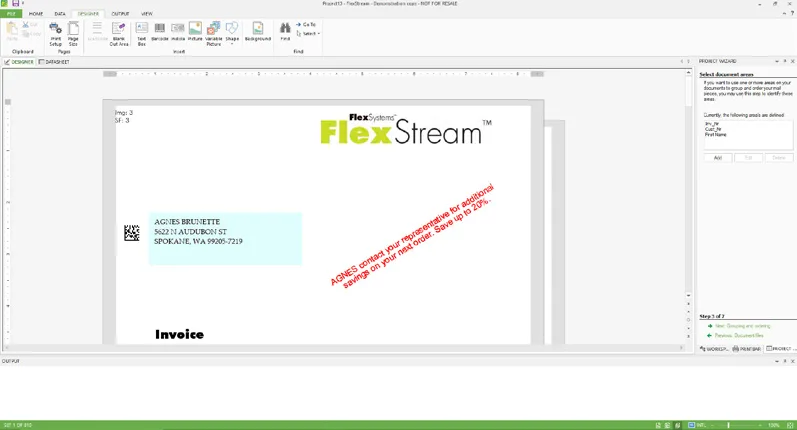
The FlexStream designer, showing an invoice with its address block, barcode and a variable message

Flex Systems

FlexStream

Scancodes, grouping and enhancement for the documents you already print.

FlexStream lets you add scancodes to your documents for your inserter to read, and manipulate and enhance the contents of a mailing without touching the system that created it. It loads existing PDF or PDF/A files, runs independently of the originating software, and its output prints on any printer. The interface follows the Microsoft Office pattern of ribbons, tooltips and wizards, so nobody needs to be a specialist to run a job.

It comes in three editions. Basic adds OMR, 1D or 2D scancodes to PDFs without changing them. Advanced adds document manipulation and enhancement: conditional text, graphics, barcodes, overlays and layout changes. Professional adds digital inserts, secure email, archiving and closed-loop processing with FlexVision.

Key features

  • Adds OMR, 1D and 2D scancodes; pre-defined codes for inserters from all major manufacturers, plus custom codes
  • Groups documents for the same recipient into one mail piece, with over-count splitting when a set is too thick
  • Conditional text, graphics and barcodes, and selective feeding of inserts by recipient
  • Overlays and digital inserts in place of preprinted forms
  • Converts simplex documents to duplex to cut paper and postage
  • Emails all or a selection of documents instead of printing them
  • Job summary with operator instructions for the inserter; datasheet preview before printing
  • Optional USPS mail processing module on Advanced and Professional: CASS address correction, NCOALink Move Update, dedupe and PAVE-certified presort
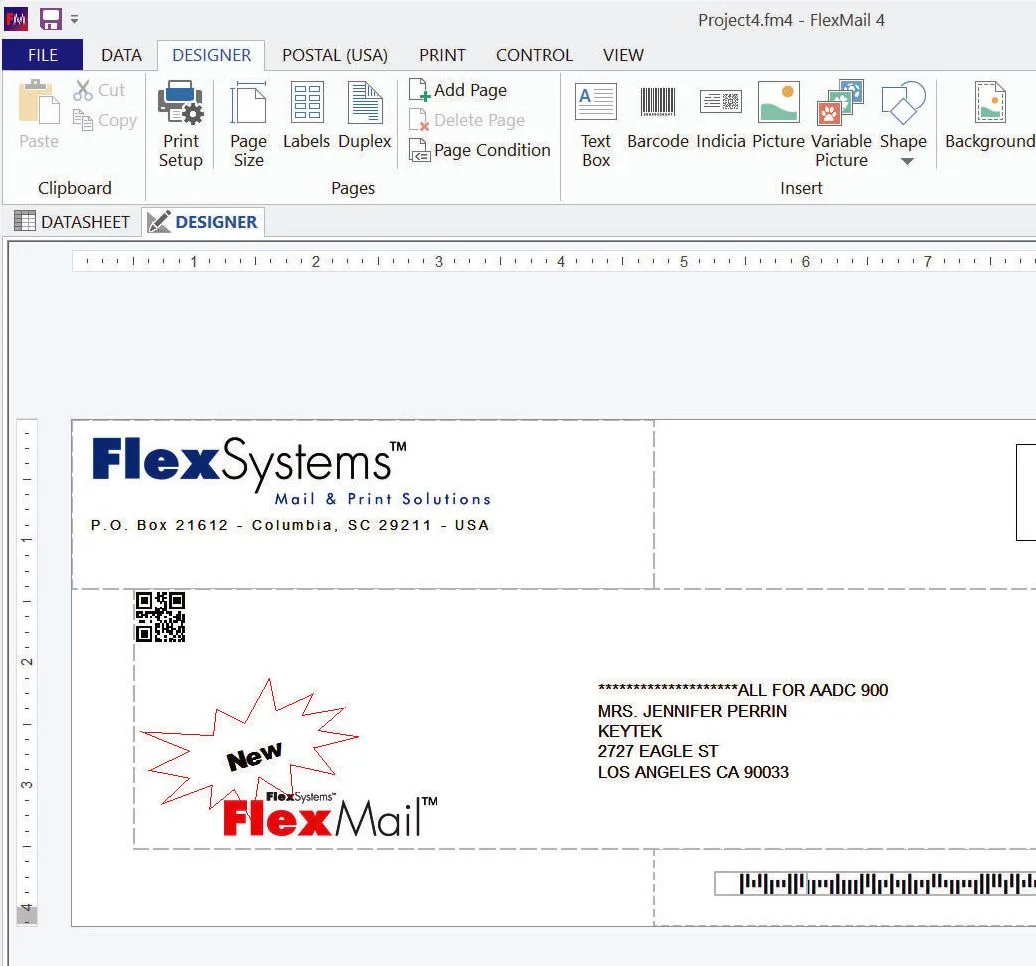
FlexMail 4 Designer screen with a variable-data envelope layout, Intelligent Mail barcode and 2D code

Flex Systems

FlexMail

Variable data design and printing for address printers.

FlexMail is a variable data design and printing solution: connect to your data, prepare it for the job, design the output, and print at speed and quality on any printer. It reads any database, including the output of postal software, and opens PDF files. Counters, dates and the contents of an Intelligent Mail barcode can be generated on the fly, and there are tools for de-duplication, export and data conversion.

Printing variable text, 1D, 2D and postal barcodes, indicia and graphics is straightforward, with guides that keep a design printable (no crossing of cartridges) and postal templates that keep it acceptable to USPS. Drivers for all addressing printers are included, from desktop units to mail-table printers, and it also prints to any Windows printer.

Key features

  • Reads any database, postal software output and PDF files
  • Generates counters, dates and Intelligent Mail barcode content
  • De-duplication, export and data conversion tools
  • Variable text, 1D, 2D and postal barcodes, indicia and graphics
  • Design guides and postal templates; built-in routines that keep print heads clean
  • Drivers for all addressing printers included; prints to any Windows printer
  • Basic, Advanced (PDF input, database tools, duplex, indicia) and Professional (printer and production-line control) editions
  • Optional USPS mail processing module: CASS, Move Update, dedupe, PAVE presort

How FlexMail simplifies back-to-school mailing

Overview · FP Mailing Solutions on YouTube

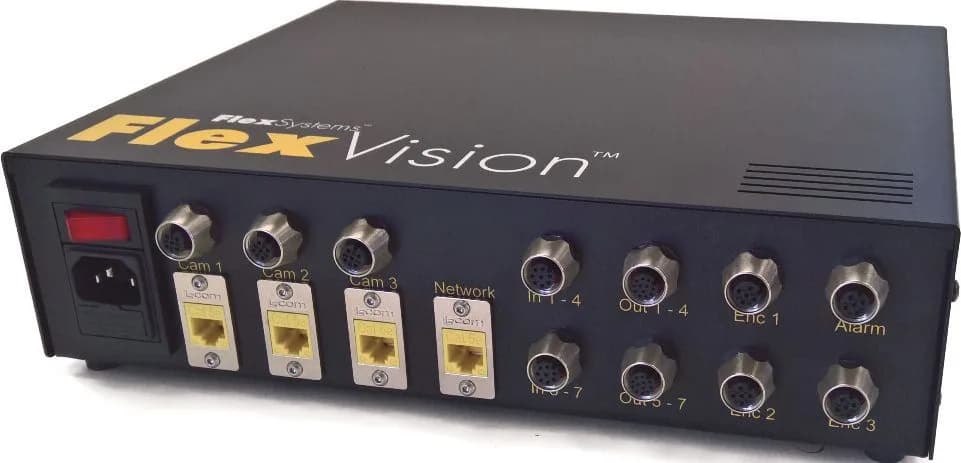
FlexVision I/O controller with camera, encoder and alarm connections

Flex Systems

FlexVision

A camera on the line that reads, matches and proves every piece.

FlexVision is a camera and mail-tracking system for addressing and inserting lines. It is built as one turnkey system: industry-standard cameras with integrated lighting and autofocus, an I/O controller that connects cameras, encoders, digital inputs and outputs and an optional alarm light tower, and the FlexMail or FlexStream Professional software that drives it all. Installation is plug and play, and camera setup is done from inside the software, where you can see what the reader sees.

It covers read-and-print, closed-loop processing, matching, in-line barcode grading and image capture, which is what makes it the verification step in a privacy-conscious mail process.

Key features

  • Read-and-print: read a barcode, look up the record in a database, print the result
  • Closed-loop processing: checks off or time-stamps each record as it passes the reader, so missing or faulty pieces can be reconciled and reprinted
  • Matching of documents collated from different inserter stations
  • In-line barcode grading to ISO/IEC standards, including USPS Intelligent Mail barcode verification
  • Image capture and indexing of documents or envelopes as proof of correct handling
  • Reads omnidirectionally, through window envelopes, and copes with damaged or poorly printed codes
  • Controller connects over Gigabit Ethernet; cameras are detected automatically
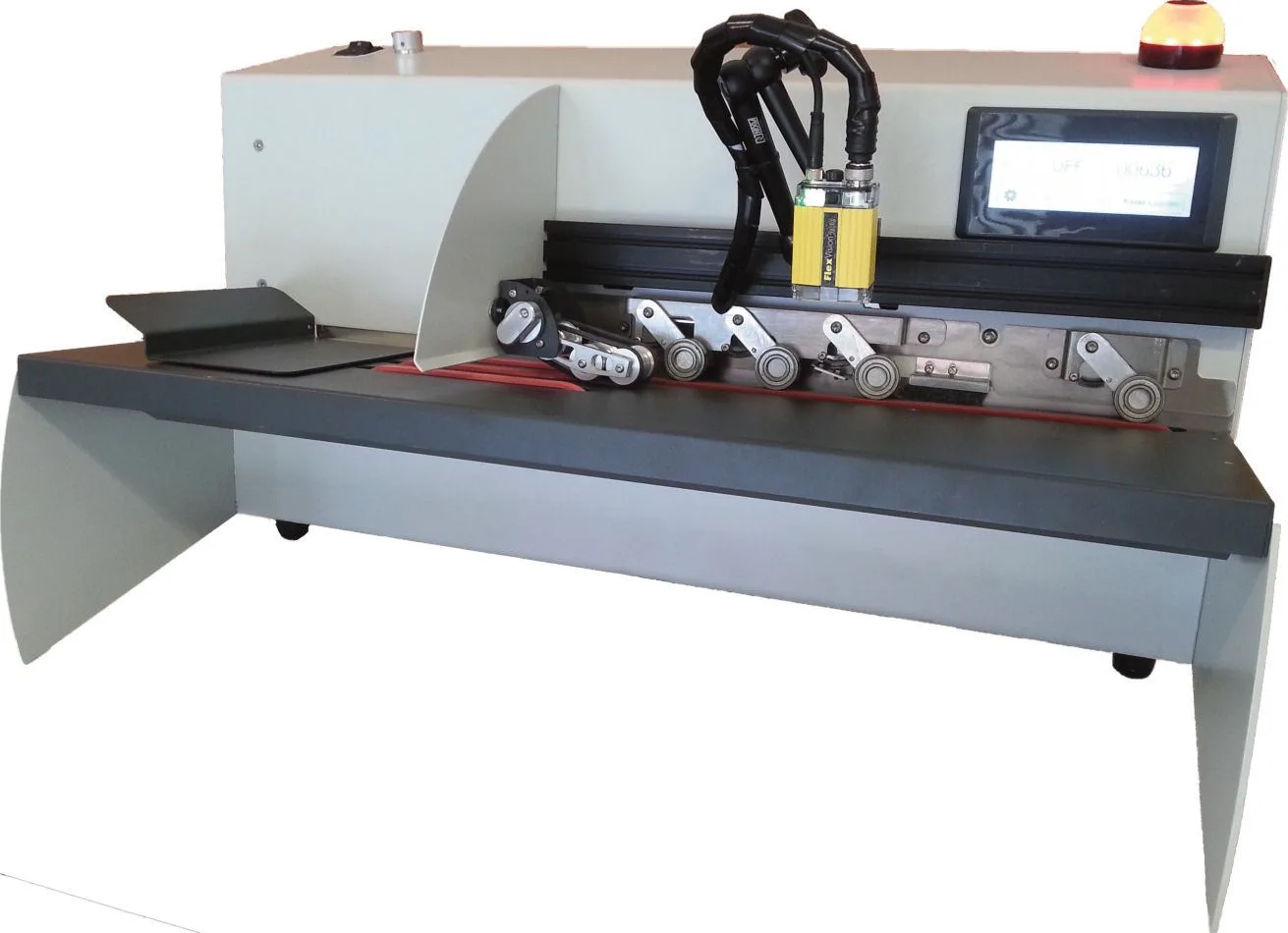
FlexCapture inbound mail station with envelope feeder and camera readers

Flex Systems

FlexCapture

Inbound and returned mail, scanned into a database instead of a bin.

FlexCapture is built for inbound mail processing and for inspecting samples of printed barcodes. It is available with or without an integrated letter opener, is controlled by FlexMail or FlexStream, and comes with templates for the most common jobs. Returned pieces that could not be delivered are marked in an existing database or used to build a new one. Replies are registered, optionally opened, and imaged so the envelopes do not have to be warehoused.

The 300 model also inspects barcodes for readability, contrast and module size, and verifies USPS Intelligent Mail barcodes on all parameters (Merlin).

Key features

  • Processes undeliverable and returned mail against your database
  • Registers reply mail, opens it if required, and captures an image of each piece
  • Date- and time-stamps every scanned envelope
  • Barcode verification, including IMB (Merlin) on all parameters, on the 300 system
  • Choice of multi-thickness feeder or integrated letter opener
  • Single TCP/IP connection to the PC; plug-and-play detection
  • Setup and live reader view inside FlexMail or FlexStream
Feeder envelope thickness
Up to 1/2 inch (12 mm)
Letter opener envelope thickness
Up to 1/4 inch (6 mm)

Secure and tracked email

FlexStream's channel selection decides, document by document, whether a piece is printed, saved as PDF, archived or emailed. The choice can rest on data in the document itself or on a lookup in a linked database, or you can pick documents by hand. Email goes through a secure and tracked service: attachments up to 6 MB are encrypted in transit, the recipient gets a normal-looking email with a link, and the file is fetched from the secure server over HTTPS. Nothing bounces because of a mailbox limit.

You write the email body once, with variable elements to personalize it, the subject line and the attachment's file name. The datasheet then shows, for every document, when it was sent, delivered, opened and downloaded. If a recipient has not opened a document within the time you set, choose a follow-up: resend it, or print and post it instead. An audit report of every emailed document can be exported.

Three editions

  • FlexStream Basic: add OMR, 1D or 2D scancodes to existing PDFs without changing them.
  • FlexStream Advanced: everything in Basic, plus document manipulation and enhancement, and the optional USPS mail processing module.
  • FlexStream Professional: everything in Advanced, plus digital inserts, secure and tracked email, archiving and closed-loop processing with FlexVision.
  • FlexMail follows the same Basic, Advanced and Professional pattern for printing.

Where it fits with the inserter

FP's FPi 5700 and FPi 6700 folder inserters read DataMatrix and linear barcodes, OMR and OCR, which is what FlexStream writes; the FPi 4800 has document reading as well. We set the pairing up on site and run your first job with you.

Brochures & downloads

Questions we get asked

Do we have to change our accounting or billing system?

No. FlexStream opens the PDF files that system already produces and runs independently of it. Breaks between documents are found from a fixed page count, from data on the page, or from data that changes between pages, so a statement run that comes out as one long PDF is split correctly.

Can it help with HIPAA mail?

It is the first step in the process we recommend for patient mail: the scancode tells the inserter which pages belong together, the machine folds and seals them, and FlexVision confirms the output matches. Our HIPAA mail page walks through the whole chain.

Which barcodes does it support?

More than 80, including 2D and postal barcodes, and custom scancodes can be defined if an inserter needs one. Guides in the software help position the code where the inserter's reader expects it.

See it on your own mail

Tell us which PostBase or folder inserter you run and what you send. We will show you the software on one of your real jobs, quote it, and set it up on your PC.