
Skip to content
Automated Mailroom

Software

Insert Ready Mail: Certified Mail with electronic return receipt, straight from your PDF

Important documents only work when you can prove they arrived. Insert Ready Mail sends Certified Mail with Electronic Return Receipt straight from the PDF print file you already produce. Every piece is printed, mailed and tracked from the moment USPS accepts it, and the signed proof comes back as a PDF, filed against the piece.

Nothing about how you make your documents changes. You send the same print file you print today, and Insert Ready Mail does everything between your printer and the signed receipt.

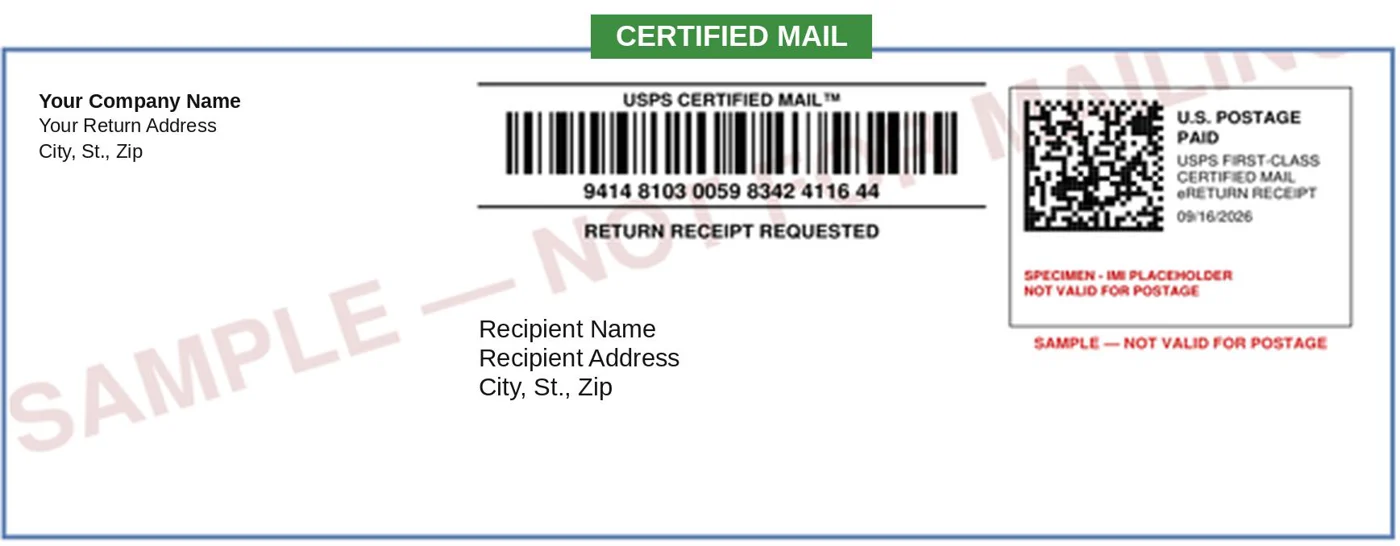
A sample Insert Ready Mail banner page: the Certified Mail barcode and article number, Return Receipt Requested, both addresses and the postage, printed together

Insert Ready Mail · eRR

Print file in. Signed proof out.

Insert Ready Mail reads the recipient, address and reference data straight from your document: no OCR, no re-keying. It adds one banner page ahead of each letter, carrying the certified article number, both addresses and live postage, and the same number lands on your reconciliation sheet.

Each set goes into a machinable, full-face envelope with the green Certified Mail tab, in one of two sizes, 6 x 9.5 or 9.5 x 11.5 inches, ready for your letter carrier. Because the number, the endorsement and the postage print together on one sheet, the barcode on the envelope is always the one on your sheet.

Key features

  • Works from the PDF print file you already produce, sent exactly as it is
  • Recipient, address and reference read from the document: no OCR, no re-keying
  • One banner page per piece with both addresses and live postage, inserted as page one
  • Full-face Certified Mail envelopes in two sizes: 6 x 9.5 and 9.5 x 11.5 inches
  • Every set counted and priced from its page count before any postage is bought
  • Overseas and other ineligible addresses flagged and held, not mailed
  • No postage meter, no extra labels
  • Every USPS scan shown against the piece, from acceptance to delivery
  • Signed proof returned as a PDF: signature, date, time and delivery address
  • Records kept for seven years, searchable by date, recipient, address, reference or tracking number (USPS keeps its own for only 18 months)

Insert Ready Mail: Certified Mail with Electronic Return Receipt

Overview · Automated Mailroom · 4:15 · captions

How it works

  1. You send your PDF print file, exactly as you produce it today. Recipient, address and reference data are read straight from the document.
  2. A banner page is built for each piece. USPS assigns the certified article number through its API. It prints on the banner page with both addresses and live postage, goes in as page one of the set, and lands on your reconciliation sheet.
  3. USPS accepts the mailing. Your carrier or post office scans the PS Form 5630 SCAN form, which time-stamps acceptance, the date many notice periods run from. PS Form 3877, the firm mailing book, lists every piece and is generated on request.
  4. Every scan is tracked. Once the mail leaves your building, each USPS scan shows against the piece. When a recipient says it never came, you can show exactly where it went.
  5. Delivered, or a recorded attempt. Signed, refused, forwarded or unclaimed, every outcome is captured. For a document with a deadline, the attempt matters nearly as much as the delivery.
  6. The receipt comes back as a PDF. USPS issues the signed proof electronically and it is filed against the piece and its reference: recipient, account, matter number, case number or any reference you choose. Nothing is mailed back, so nothing is lost.

Checked before any postage is bought

Every run is counted first. The pages in each set, banner page included, set the postage, and it is worked out before any is bought, so nothing is short-paid and nothing is rounded up. Your letter itself passes through untouched.

Certified Mail and electronic return receipt are domestic services. An address they cannot go to, like one overseas, is flagged and held rather than mailed as something that looks certified and is not.

The green card or the electronic receipt

Both are USPS proof of delivery. The difference is everything around it. The green card, PS Form 3811, costs $4.65 a piece, typically comes back by mail in two to three weeks, and someone has to open, match and file each one; if it is lost, so is your proof. The electronic return receipt costs $2.91, typically arrives in days as a PDF, is filed against the piece automatically, and can be reissued from the record.

That is $1.74 less per piece in USPS fees alone: $87 to $174 a month at 50 to 100 pieces, $174 to $348 at 100 to 200, and $870 a month at 500. The fees are USPS retail prices from Notice 123, effective July 12, 2026, the same figures as USPS rates, and they change when USPS changes them. Delivery times are typical, not guaranteed.

Works with the folder inserter you have

Already have a folder inserter? Whether it came from Automated Mailroom or another manufacturer, it can be programmed to run the banner-page sets as a new job, with no change to your hardware. Insert Ready Mail works with any folder inserter. If you do not have one, see Folder inserters.

Every outcome, on record

The status of any piece is a lookup, not a phone call. Open the PDF for the signed receipt, or download the delivery PDFs to your own server.

  • Delivered, including to an agent or left with an individual, with the signature captured.
  • Attempted, still moving: notice left, available for pickup, picked up, redelivery scheduled, forwarded, held at the Post Office.
  • Returned: refused, unclaimed, returned to sender, delivered to the original sender.
  • Undeliverable: as addressed, insufficient address, no such number, vacant, addressee unknown.

Who it is for

Any organization that sends a lot of Certified Mail with return receipts:

  • Law firms
  • Collection agencies and debt collectors
  • Property management companies
  • Healthcare organizations
  • Banks, credit unions and other financial organizations
  • Schools, colleges and universities

Questions we get asked

Do we have to change how we produce our documents?

No. You send the same PDF print file you print today, exactly as it is. Insert Ready Mail reads the recipient, address and reference from the document and adds a banner page ahead of each letter.

Is the electronic receipt as good as the green card?

Both are USPS proof of delivery. The electronic receipt costs less ($2.91 against $4.65 for the green card, at USPS retail prices), typically arrives in days instead of two to three weeks, and can be reissued from the record if it goes missing.

What envelopes does it use?

Certified Mail envelopes with the green tab, made to run through USPS sorting machines, in two sizes: 6 x 9.5 and 9.5 x 11.5 inches. (CertifiedMailStream, our browser-based service, prints a cover page for #10, 6 x 9 and 9 x 12 double-window envelopes, or a thermal label for the envelope you already use.)

How is this different from CertifiedMailStream?

CertifiedMailStream, our browser-based service, prints a Certified Mail cover page or thermal label without postage. Insert Ready Mail prints the banner page with the postage on it, straight from your print file.

How long are the records kept?

Seven years, for the records you download from USPS each week. USPS keeps its own delivery records for only 18 months; once downloaded, they stay in Insert Ready Mail for seven years, searchable by date, recipient, address, reference or tracking number.

Can we send Certified Mail overseas?

No. Certified Mail and electronic return receipt are domestic services, so an overseas address is held back from the run.

How do we try it?

Send us a sample PDF print file with dummy names and addresses (Sales@AutomatedMailroom.com, or call (877) 870-6805). Do not email files with real patient or client data; ask us for a secure way to send them. We run the sample through the system and give you the barcoded output to review. You can start with one mailing.

Send us a sample PDF

Send us a sample PDF print file, laid out like the ones you produce today but with dummy names and addresses. Do not email files with real patient or client data; ask us for a secure way to send them. We process the sample and give you the output to review, then we can start with your next mailing.